


By: COMMANDER ENTERPRISE

(part I)
Computers run different components at any given time. One of the results of operating such a complex system is the heat generated inside the CPU from all the internal to and fro activity.
Usually, computers would have a lot of activity from its video cards, hard drives and all active circuitry that go back and forth from any installed devices or drives to the processors when retrieving and processing data. Add to that the external activity from broadband internet (surfing, downloads, uploads and etc.) from the broadband modem, active external parts, the internal applications and all other processes that are running all at the same time.
Now, imagine all the activity from the processors and the active components that are performing in unison, and one can imagine its similarities with other equipment that can overheat from not only its regular activities, but also from a few external factors that can add and also affect temperature and performance under pressure (and increasingly rising temperatures).
Keeping it Cool Inside and Out
People who use their computers for more than five hours a day are more susceptible to generating too much heat, as do multi-tasking, heavy interactive gaming or surfing the net with heavy content and doing other things while online. This applies to most of our users on the broadband informational superhighway with many bytes of data transfers and processes involved. But thanks to more efficient cooling systems, from basic to the more advanced ones, computers and their respective owners have a lot to be thankful for in making sure their units stay in tiptop shape.
The basic cooling systems included with most computers involve fans and heat sinks with cooling paste situated in strategic places in the circuitry and chipset. The combination of the fan and heat sink helps spread the heat waves to avoid temperature build up. Some computer cases have well developed cooling fans that are bigger and cooler than regular ones, for heavy duty use.
We have the standard cooling fans, while other fan sets are geared to generate more cooling for high-performing and more complex computers. There are also a few main types of fans that can be installed, specifically for high-performance parts in the often-overheated CPU, especially for the installed memory or the video/graphics card, two of the areas that are the busiest and most prone to overheating.
Aside from standard fans and heat sinks that are strategically placed, are dedicated fans for specific parts inside. Another thing that helps a lot with computer temperature is the control of the external temperature and surrounding area where the computer is. That and also, regular cleaning and maintenance. Both are the most controllable aspects of it and can greatly help with the overall cooling and maintenance.
Preferably, computers have to be in direct line of cooling fans or in an air-conditioned room, which would tremendously help busy computers in maintaining a constant low temperature inside and out.
Other users try to maximise the cooling effect by leaving the computer case, or sometimes part of it, open for natural surrounding air to cool the parts down. However, it is also an equally risky move, as this attracts external elements that otherwise stick to and congest important parts, and also accumulate dust and dirt.
Chill!
The Art of Cooling Computers
(part II)
As most computer enthusiasts would agree, leaving the internal parts open just for aerating also opens it to dust and dirt, and they stick to small parts and corners, and ultimately adds to higher temperatures when parts are trapped and covered. It also makes internal parts dirty, leaving less area for ventilation, and more for cleaning, which could be a nuisance since the smaller internal parts and circuitry will be basically hard and risky to clean directly.
Now, maintaining a clean internal area and well placed internal parts to avoid dust and dirt build-up and to ensure proper aeration and airflow may be too tedious for some. But regularly doing it adds even more mileage and operating life to the computer to sort out heat avoidance and build-up and also make sure all the parts that badly need cooling will get it equally.
In addition to these are specific settings you can alter via the BIOS entry. You can control fan settings, add a fan control app, and monitor your CPU temperature.
More Advanced Solutions
There are also more drastic approaches to this issue, one that involves more advanced strategies and technology, depending on the price tag that the owner can afford and the level of cooling needed. For more advanced and complex computers or workstations, this is an optimal application that can bring out the best from the unit and drastically improve and avoid heat-related issues and causes. This involves methods such as liquid-based cooling systems that are either directly or indirectly cooled by water or special cooling liquids, among others.
One is the use of liquid aided cooling systems that use water in tandem with special cooling fans to deliver much cooler air inside to the CPU, and get the heat out in a continuous cycle to eliminate trapped heat and temperature build up. Other types also involve water pipes to the regulated parts that grab the heat and eliminate them out of the device continuously.
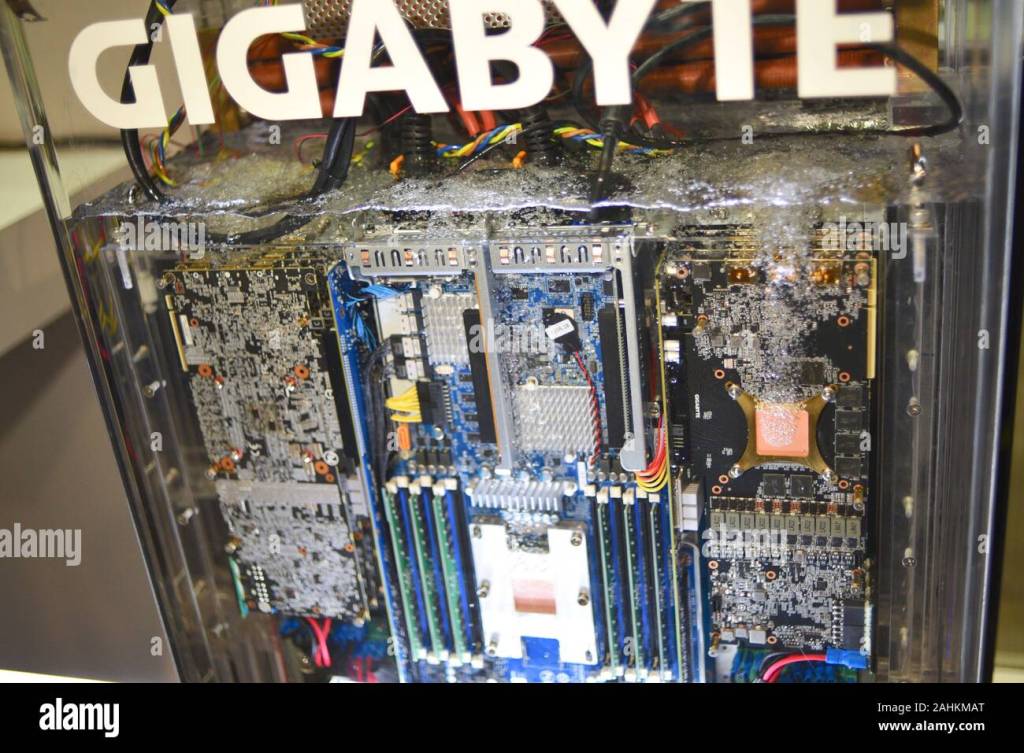
Right now, the ultimate cooling system has been developed by the 3M company with Novec, a special fluid used for fire protection outside the computer world. The circuitry is directly submerged into the liquid, which controls temperatures and regulates it without any moving parts or high energy usage. It doesn’t conduct electricity or heat and keeps temperatures low, perfect for utilising in an energy-saving and self-sufficient cooling system.
The liquid keeps the temperature constant, eliminating the heat by vaporising it out of the liquid and the submerged parts. Then, the liquid flows back to the immersion via a condenser at the top, making it a self-cycling and self-sufficient system that doesn’t use up too much energy.
This advancement in computer systems cooling has enabled bigger workstations and computers for worry-free operations that would otherwise generate unmanageable heat and demand even more energy consumption with regular cooling methods. It seems to be the wave of the future for cooling solutions, as it is being developed for bigger operations such as large business data networks and servers.
Currently being showcased in the 3M Minnesota office is a completely submerged supercomputer internal system to show how the immersion technique in Novec fluid works splendidly specially for larger computers and network systems, and can be the standard of the future once the full potential and application has been tested and perfected even more.



 Towards Harmonious Civilization Zine
Leave a comment